ip
Mei User Guide

Welcome User😄!
And behold, your personal Task Managing Assistant, Mei! This application is optimized for usage via a Command Line Interface (CLI) while still having a Graphical User Interface (GUI).
With Mei, you can:
ALL your tasks!! 🥳
Getting Started
Follow these steps to start chatting with Mei:
- Download this JAR file.
- Move/ copy it to an empty folder.
- Open up your command prompt.
- Navigate to the folder where the JAR file is at using the
cdcommand. - Type
java -jar mei.jarto launch the application. - All Done! You may proceed to chat with Mei 🥳
Adding ToDos
You may add ToDo tasks by typing the following command:
todo {task name}
For instance:
todo return books
You may expect an output like this:

Adding Deadlines & Events
You may add Deadline and Event tasks by typing the following command:
deadline {task name} /by {date/time}
event {task name} /from {date/time} /to {date/time}
IMPORTANT
The format of the date/time has to be in day/month/year HoursMinutes in the 24-hour time format. However, you may swap out the
/for-, but it also has to be either all/or-! The day and year may be swapped too.
For instance:
deadline go to library /by 25/02/2025 1600
event watch a movie /from 2025-02-25 1100 /to 2025/02/25 1300
You may expect an output like this:


Listing All Tasks
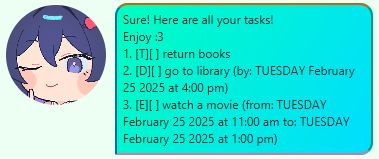
After adding a few tasks, you may want to see what you have added so far.
Simply type list, and you can see:
Marking/ Unmarking a Task
What’s a task management assistant if she can’t even
mark/unmarkyour tasks for you? - Me
To mark/ unmark the completion of your tasks, simply type:
mark {task number}
unmark {task number}
TIP
Use the
listcommand to see the number of your tasks on the list!
For instance:
mark 1
unmark 1
You may expect an output like this:


Find Feature
Finding specific tasks from your long list is tough sometimes MADE EASY!
You may find any tasks by typing the following command:
find {keyword}
NOTE
The keyword to find a task must be part of the task description!
For instance:
find library
You may expect an output like this:

Undo Feature
Undo previous commands within the same user session by typing undo!
Save Feature
NOTE
You may be wondering, where do the tasks get saved to in your devices? Well fear not! Here’s the
mainmethod 😉 You may find all of your saved task data from the given relative path!Note that this path is relative to the folder that the .jar file is kept in.
public static void main(String[] args) {
    new Mei("./taskdata/tasks.txt").run();
}